


CS2 Tick Rate Explained: Effect on Gameplay, Sub-Tick, and More
When playing CS2, you create a stream of actions, such as movement, shooting, and grenade throws. As a human being, you see everything happening in the game as a gapless flow. The CS2 server works differently, as it has ticks—or steps—of the update cycle. They can be imagined as splashes that include data exchange and coordination of in-game situations.
The number of these ticks per second is referred to as the tick rate in CS2. It is logical to assume that the higher tick rate the server works on, the smoother the in-game coordination becomes. However, the developers from Valve decided not to follow this direct path but used a more advanced technology of sub-ticks. Thanks to it, the game records the timeline of action even between the ticks.
All the important details about the CS2 tick rate and how sub-ticks work are in this guide on DMarket Blog.
What is Tick Rate in CS2?
CS2 runs with the 64 tick rate.
Counter-Strike 2 servers have an update cycle of ticks that synchronize positional data and the whole game state. The tick rate in CS2 is the number of these synchronizations per second. Having a 64 tick rate means that CS2 runs on the update cycle with 64 ticks per second.
At the same time, naming the 64 tick rate update cycle as the basis for CS2 servers doesn’t reflect the modern technology implemented in the game. The developers moved Counter-Strike 2 to the sub-tick system, where player actions are recorded and coordinated with their precise timing.
CS2’s New Sub-Tick System Explained
With the release of Counter-Strike 2, Valve introduced a new technical paradigm for the server’s update cycle. In addition to the traditional ticks, the game records every input with the exact timestamp, down to milliseconds. This system allows the CS2 servers to recognize the flow of actions between ticks and coordinate everything that happens in the game as a gapless sequence.
- The 64 Hz update cycle is universal for all CS2 servers. It’s how the game works, and even the community servers follow this tick rate.
- The sub-tick system records each input with the exact timestamp. Even if a shot, movement, or a jump happens between ticks, the game puts them into the timeline of action with the exact moment of occurrence.
- The time between ticks with the 64 Hz update cycle is 0.015625 seconds, which is 15.625 milliseconds. Even within this minimal gap between ticks, CS2 can compare the timing of each action and correctly calculate outcomes: whose headshot lands, and how much damage an HE grenade deals. This has become possible because of the sub-tick system.
Thanks to bringing sub-ticks to Counter-Strike 2, the effectiveness of the 64 tick rate reached the level of 128 Hz servers—and even surpassed it. These 64 ticks per second are still important, as they are responsible for general synchronization.
With sub-ticks, the game has less synchronization issues, which may bring you more good matches and nice items from the CS2 drop system.
CS2 vs. CS:GO Tick Rate
In CS:GO, tick rate was a crucial factor. All the actions between ticks were put into one package, as if they happened at the same moment.
CS:GO servers received those packages and synchronized the match state via settled steps, for specific times per second: 64 or 128. The official matchmaking had a 64 Hz update cycle, so it had 64 ticks per second. Some third-party and community servers used a 128 Hz update cycle. It was generally considered better to play with 128 ticks per second, as such a tick rate applied shorter gaps between synchronization and therefore fewer potential conflicts.
In CS2, all servers run with a 64 Hz update cycle, but thanks to the sub-tick system, this tick rate is less important. The general synchronization still happens with 64 ticks per second. However, the game can register precise timestamps of each input and coordinate players’ actions flawlessly.
| CS:GO | CS2 | |
|---|---|---|
| Tick rate | 64 Hz in the official matchmaking and 128 Hz on some third-party servers, such as FACEIT. | 64 HZ for all game servers, including the community’s ones. It’s how the game operates now. |
| Input processing | Fixed intervals of the traditional tick rate system. | Gapless record of inputs with the exact timestamps thanks to the new sub-tick system. |
| Time delay for general synchronization and input registration | 15.625 ms (64 Hz) or 7.8125 ms (128 Hz). | 15.625 ms for general synchronization and no delay for input registration with the sub-tick system. |
| Gameplay effect | Potential inconsistencies with coordinating precise actions between ticks: missed shots, false positionings, etc. | All the actions are registered within a gapless timeline, and conflicts in coordination are not caused by ticks. |
| Importance of tick rate | Critical, and the 128 Hz update cycle was considered superior. | Less important: all CS2 servers run on the 64 tick rate, and all use sub-ticks for input registration. |
Although the sub-tick system solves some synchronization issues, it’s not a full protection from frustrating situations. Your headshot still can miss on the server’s side when it certainly landed on your screen. Or you can get killed by a guy who aimed a few inches away from your character model.
Possible reasons for this include high ping and low FPS on your side. CS2 is a game about really quick actions, and every moment matters here. Valve has introduced the True View system that allows you to see your matches from the server’s point of view and therefore explain such conflicts—unless your opponent really was a cheater.
Another important technical aspect is the audio settings. In CS2, you need to hear surrounding sounds for better reactions and therefore better performance in competitive matches.
How to Check CS2 Tick Rate with a Console Command
You can use the console command cl_showfps 3, so the game will display the network statistics, including the current tick rate.
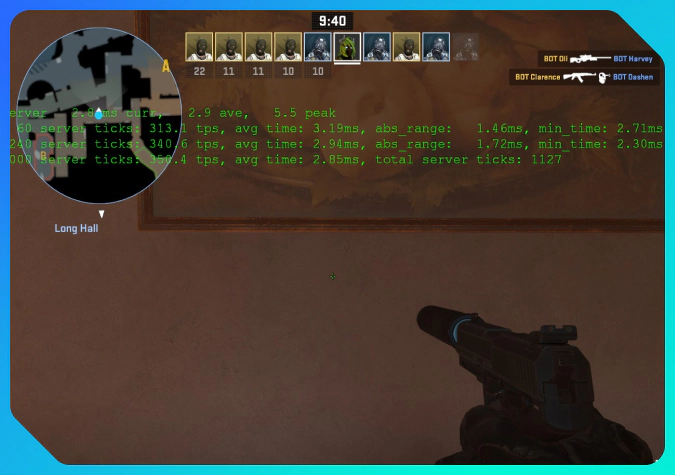
- Press tilde, ~, to open the developer console. It should be enabled in the CS2 game settings.
- Enter the command cl_showfps 3 to see detailed network statistics. The tick rate or server update rate will appear among the statistics.
- Use cl_showfps 0 to remove the network stats from the screen.
As all CS2 servers have a 64 tick rate, there is no real need to check this aspect, unless you want to.
Take a look at our guide on CS2 console commands to know the most useful ones to use in your game.
How Tick Rate Affects Gameplay
Beyond the technical explanation, CS2 tick rate is still strictly about gameplay.
-
64 ticks per second means that the game server conducts general synchronization 64 times per second, or every 15.625 milliseconds. This includes positions of the objects, such as character models, and their state, such as fire spread from the Molotov.
-
Sub-tick processing is about recording input of actions as they happen between those 64 ticks. Your shots, crouches, jumps, and grenade throws are recognised within the gapless timeline and synchronized with actions of other players, considering the exact moments of input, down to milliseconds.
The CS2 tick rate with the sub-tick system reduces action conflicts that happened because of tick gaps in the previous game, CS:GO. With powerful hardware on your side and a good internet connection, you can expect all your actions to be registered as you see them on the screen.
It’s still not that perfect in practice, as there are other players in CS2. Teammates and opponents can bring their high-ping lags into your game, which affects your experience, too. If you know how to 1v1 in CS2, the potential technical issues reduce alongside the number of participants.
Conclusion
The sub-tick system records action inputs between ticks. It was introduced in Counter-Strike 2 so that the game has fewer coordination conflicts than it did in CS:GO with a fixed tick rate.
As all CS2 servers run in a 64 Hz update cycle, there is no practical need to worry about this aspect. When you understand the technical details, you can return to playing the game and to improving your skills. If the issues continue, they can be caused by high ping or low FPS on your side or on the side of your teammates and opponents.
FAQ
Does tick rate affect FPS or ping?
No, tick rate does not affect frames per second (FPS) and ping in CS2. These are very different parameters. Ping depends mainly on your internet connection. FPS is about the power of your hardware. For more info, check out this article on how to increase FPS.
Is sub-tick better than 128-tick?
Yes, the sub-tick system is better as it records inputs with the exact timestamps between ticks. This method provides better synchronization of actions than increasing the tick rate.
Still, the 128-tick with sub-tick processing could be even better, at least in theory. Valve may bring this feature in the future.
Why do some players still talk about tick rate in CS2?
In such a competitive game as CS2, people really care about their performance. Various technical aspects can affect it. Tick rate was a big deal in the CS:GO era, as third-party servers could run with a 128 Hz update cycle. The conversations about tick rate in CS2 are a flashback from that period. There is no choice beyond 64 tick servers, and the very system operates differently because of sub-ticks.
Trade on the go - install the mobile app of DMarket from Google Play or App Store. Never miss great prices and unique skins. The best CS2, Dota 2, Rust and TF2 marketplace is always at hand!


Stay tuned to DMarket Blog for more CS2 guides and info about skins trading and follow us on Facebook and Twitter.