


S1mple CS2 Settings, Config & Crosshair: Play Like a Pro
Oleksandr “s1mple” Kostyliev reached mind-blowing competitive heights in CS:GO esports. Many analysts consider him one of the best players of that era. With the transition to Counter-Strike 2, s1mple changed teams to experience a fresh start in his professional career. It did not affect the settings s1mple uses for CS2, as they are pure efficiency. Still, the player has changed his crosshair and hardware.
In terms of playstyle, s1mple is known for his versatility. In different game situations, he performs miracles with both assault and sniper rifles. Aggressive and unorthodox actions have brought the player amazing results.
Most people associate s1mple with his time in NAVI. His decision to bench himself and then move to a small team—BC.Game Esports—in 2025 was an utter shock to fans. In a lower-tier league, s1mple has to climb back to the top.
The Most Important S1mple Settings in CS2
If you enjoy bold offense and like switching weapon types during CS2 matches, s1mple’s settings may help you unleash your true potential. In the following sections, we highlight all the vital options you should use for your game.
Mouse Settings
This part of s1mple’s CS2 setting is very unusual. He prefers high sensitivity for his mouse, which requires smaller physical movement with flawless precision.
Using such mouse settings is accessible to casual CS2 players. If you don’t use special large mousepads and have limited space on your desk, high sensitivity can be somewhat more convenient for you.
- Mouse: Logitech G Pro X Superlight 2 Black
- DPI: 400
- Sensitivity: 3.09
- eDPI: 1236
- Zoom Sensitivity: 1
- Hz: 1000
- Windows Sensitivity: 6
Video Settings: Performance and Visibility
For CS2 video settings, s1mple keeps somewhat old options from CS:GO. The resolution is low, and the aspect ratio is unusual for modern gaming monitors. Many who started playing Counter-Strike a long time ago prefer keeping the game image as it was back in that early era.
- Resolution: 1280x960
- Aspect Ratio: 4:3
- Scaling Mode: Stretched
- Brightness: 110%
- Display Mode: Fullscreen
A limited image quality for the best technical performance is the name of the game in the advanced video settings. Like other CS2 professionals, s1mple plays the game for competitive reasons, not for visual beauty.
This part has a lot in common with NiKo’s CS2 settings.
- Boost Player Contrast: Disabled
- V-Sync: Disabled
- Maximum FPS In Game: 0
- Multisampling Anti-Aliasing Mode: 8x MSAA
- Global Shadow Quality: High
- Dynamic Shadows: All
- Mode/Texture Detail: Low
- Texture Filtering Mode: Bilinear
- Shader Detail: Low
- Particle Detail: Low
- Ambient Occlusion: Disabled
- High Dynamic Range: Quality
- FidelityFX Super Resolution: Disabled (Highest Quality)
- NVIDIA Reflex Low Latency: Disabled
- NVIDIA G-Sync: Disabled
Crosshair Settings and Code
S1mple experiments with his crosshair settings in CS:GO and CS2 quite a lot. Reportedly, he adjusted this aspect even after signing with BC.Game Esports. Now, his crosshair is small but has rather thick lines. Using the yellow color is quite unusual.
For a quick comparison, take a look at a list of the best crosshair settings in our dedicated article.
- s1mple’s crosshair code: CSGO-iCxok-KTVNX-shCzf-Evoek-weaAB
- Style: Classic Static
- Follow Recoil: No
- Dot: No
- Length: 1
- Thickness: 1
- Gap: -4
- Outline: No
- Color: Yellow
- Red: 255
- Green: 255
- Blue: 255
- Alpha: Yes
- Alpha Value: 255
- T-Style: No
- Deployed Weapon Gap: No
- Sniper Width: 0
Viewmodel Settings
The following options determine the position of the character’s hand and weapon on the game screen. S1mple prefers an interesting variation of the universally best CS2 viewmodel settings, but with a centered vertical position (Offset Y).
- FOV: 68
- Offset X: 2.5
- Offset Y: 0
- Offset Z: -1.5
- Presetpos: 2
HUD Preferences
It’s a rather small section of CS2 settings: we can notice that s1mple prefers the light blue color for his HUD elements.
- HUD Scale: 1
- HUD Color: Light Blue
Radar Settings
This section reflects s1mple’s preferences for CS2 radar. The general size and the map zoom are somewhat decreased.
- Radar Centers The Player: Yes
- Radar Is Rotating: Yes
- Radar HUD Size: 0.83
- Radar Map Zoom: 0.45
- Toggle Shape With Scoreboard: Yes
Monitor Settings
Check out s1mple’s monitor settings here. His model may differ from yours, but manufacturers make some options universal.
- Monitor: ZOWIE XL2586X+
- DyAc: Premium
- Black eQualizer: 10
- Color Vibrance: 12
- Low Blue Light: 0
- Picture Mode: Standard
- Brightness: 80
- Contrast: 60
- Sharpness: 5
- Gamma: Gamma 3
- Color Temperature: Normal
- AMA: High
Equipment Setup
As for hardware preferences, s1mple follows the modern trends and leans towards progressive innovations. He certainly likes Logitech products.
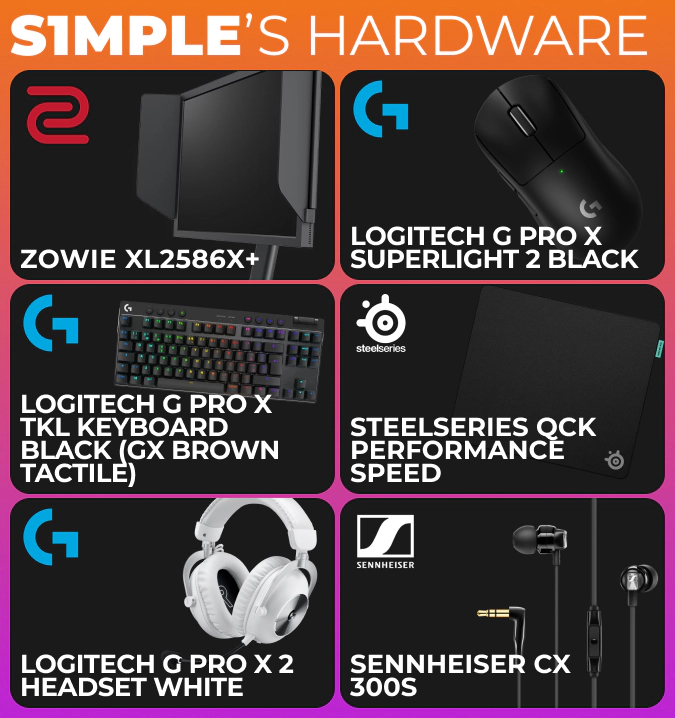
- Monitor: ZOWIE XL2586X+
- Mouse: Logitech G Pro X Superlight 2 Black
- Keyboard: Logitech G Pro X TKL Keyboard Black (GX Brown Tactile)
- Mousepad: SteelSeries QcK Performance Speed
- Headset: Logitech G PRO X 2 Headset White
- Earphones: Sennheiser CX 300S
How to Apply S1mple’s Settings in CS2
Each part of s1mple’s settings has a special section in the CS2 game menu. For most options, you should select the variants or add the values manually.
- Click the gear icon in the top left corner.
- In the game settings menu, scroll through the available options and synchronize them with everything s1mple prefers for his game.
- While adjusting the crosshair settings, you can copy and paste s1mple’s CS2 code.
S1mple’s Settings Compared to Other Pro Players
High mouse sensitivity clearly distinguishes s1mple’s CS2 settings, as most other professionals prefer smaller in-game actions with bigger physical movements—for easier precision. It’s worth experimenting with this approach, but even on the casual level, low sensitivity is more advisable.
While many seasoned Counter-Strike competitors keep low video resolutions, including s1mple, this classic habit often loses to modern trends. For example, in ropz’s CS2 settings, you’ll find Full HD and the 16:9 aspect ratio.
Similar to his playstyle, the CS2 settings of s1mple are rather unorthodox and may not click with everyone. Still, considering the player’s successes, it is certainly worth giving them a try in your games. Feel free to adjust your playing environment for the max convenience—and don’t forget that it’s practice that makes you a better player, not just settings.
Trade on the go - install the mobile app of DMarket from Google Play or App Store. Never miss great prices and unique skins. The best CS2, Dota 2, Rust and TF2 marketplace is always at hand!