


ZywOo’s Settings in CS2: Crosshair, Viewmodel, Video Settings and More
Mathieu “ZywOo” Herbaut is one of the brightest icons of Counter-Strike esports. He is an AWPer, and this role traditionally draws the most attention. ZywOo has generated tons of wow moments in the game, thanks to his brave positioning and close-to-flawless accuracy. You can copy ZywOo’s CS2 settings to try to improve your personal results.
The talent and skills of this guy were recognised by Team Vitality back in 2018. The esports organization signed ZywOo, and he’s been competing in the main roster for quite an extended period.
ZywOo’s won three Majors, at the time of writing. This number sure can increase, as Team Vitality strongly dominates the pro scene. On the individual level, ZywOo has been named the best player of the year four times.
Important ZywOo Settings in CS2
The most important parts of the ZywOo pro settings are his mouse and crosshair preferences. This focus is dictated by the team role. AWPers are responsible for precise frags to earn an advantage for their teams. Accuracy of headshots is the key here.
The AWP gave the name to this role, and it’s on the top of the CS2 weapon tier list. Still, ZywOo certainly cannot take this gun to every round. The economic factors force him to pick cheaper sniper rifles, assault rifles, or SMGs. Therefore, the CS2 settings of ZywOo should be universally good, to let the player be effective in all sorts of situations.
Mouse Settings
As the main tool for aiming, a CS2 sniper’s mouse should perfectly reflect physical actions on the game screen. Low sensitivity settings help ZywOo achieve this.
- Mouse: Pulsar ZywOo The Chosen Mouse Black
- DPI: 400
- Sensitivity: 2
- eDPI: 800.00
- Zoom Sensitivity: 1
- Hz: 1000
- Windows Sensitivity: 6
Video Settings: Performance and Visibility
The main purpose of ZywOo’s video settings is to reach the highest level of visibility in CS2 with the best performance. The idea is to see in-game actions quicker, not to strive for visual beauty.
- Resolution: 1280x960
- Aspect Ratio: 4:3
- Scaling Mode: Stretched
- Brightness: 71%
- Display Mode: Fullscreen
The following options are listed as the Advanced Video Settings in the Counter-Strike game menu.
- Boost Player Contrast: Enabled
- V-Sync: Disabled
- Maximum FPS In Game: 400
- Multisampling Anti-Aliasing Mode: 4x MSAA
- Global Shadow Quality: High
- Dynamic Shadows: All
- Mode/Texture Detail: High
- Texture Filtering Mode: Anisotropic 4x
- Shader Detail: High
- Particle Detail: High
- Ambient Occlusion: Medium
- High Dynamic Range: Quality
- FidelityFX Super Resolution: Disabled (Highest Quality)
- NVIDIA Reflex Low Latency: Enabled
- NVIDIA G-Sync: Disabled
Crosshair Settings and Code
ZywOo plays with a pretty standard, small crosshair. It’s dot-less but nicely visible thanks to the length. The color is one of the defaults: cyan. ZywOo’s crosshair settings in CS2 are listed below.
- Style: Classic Static
- Follow Recoil: No
- Dot: No
- Length: 1.5
- Thickness: 0
- Gap: -3
- Outline: No
- Color: Cyan
- Red: 0
- Green: 255
- Blue: 0
- Alpha: Yes
- Alpha Value: 255
- T-Style: No
- Deployed Weapon Gap: No
- Sniper Width: 0
- ZywOo crosshair code: CSGO-E9RyF-Mv3Uv-67Cp3-GtHxR-k8aYO
Viewmodel Settings
The position of ZywOo’s gun on the screen is close to the universally best viewmodel settings. The position is to the maximum right and pretty away from the screen: Offsets X and Z. The vertical placement is in the middle of the available range.
- FOV: 68
- Offset X: 2.5
- Offset Y: 0
- Offset Z: -1.5
- Presetpos: 2
HUD Preferences
ZywOo prefers the default size of HUD in Counter-Strike. He uses the team color.
- HUD Scale: 1
- HUD Color: Team Color
Radar Settings
Like some other CS2 pro players, ZywOo prefers to have Radar rotating. In general, this part of the game settings keeps the default values.
- Radar Centers The Player: Yes
- Radar Is Rotating: Yes
- Radar HUD Size: 1
- Radar Map Zoom: 0.7
- Toggle Shape With Scoreboard: Yes
Monitor Settings
Monitors by ZOWIE are considered the quality standard for dedicated CS2 players. ZywOo follows this tradition, and he uses the following monitor settings.
- Monitor: ZOWIE XL2566K
- DyAc: Premium
- Black eQualizer: 12
- Color Vibrance: 20
- Low Blue Light: 0
- Picture Mode: FPS 1
- Brightness: 83
- Contrast: 50
- Sharpness: 10
- Gamma: Gamma 3
- Color Temperature: User Defined
- Red: 100
- Green: 100
- Blue: 100
- AMA: Premium
Equipment Setup
For his gaming equipment, ZyWOo uses a mix of brands. He still keeps a focus on ASUS products, including one of the best keyboards for Counter-Strike.
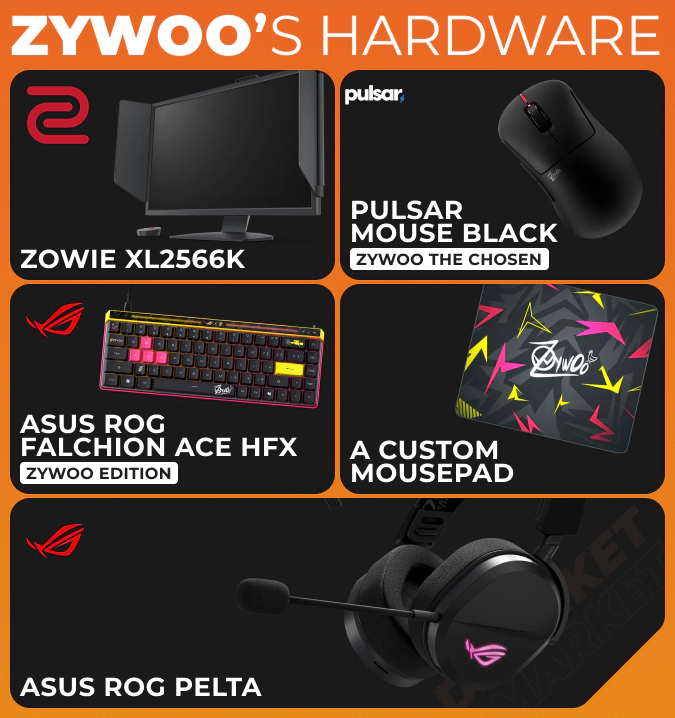
- Monitor: ZOWIE XL2566K
- Mouse: Pulsar ZywOo The Chosen Mouse Black
- Keyboard: ASUS ROG Falchion Ace HFX ZywOo Edition
- Mousepad: A custom mousepad
- Headset: ASUS ROG Pelta
How to Apply ZywOo’s Settings in CS2
All the options in our article are available for adjusting via the default game menu. Take the following steps to copy ZywOo’s settings to your CS2 experience.
- Open the game settings menu. The icon for this is located in the upper left corner.
- Follow the settings sections from our list and select the same values and parameters in your game.
- Save the changes and play Counter-Strike like ZywOo—at least in the settings department.
You can revert all the adjustments in the same menu by restoring default settings via the special button.
Keep in mind that even ZywOo can make changes in his settings: to react to game updates. For example, the transition to MR12 applied additional pressure to each round, so that AWPers can’t rely on the following buys but have to use the available weapons more effectively. This could motivate players, including ZywOo, to bring an extra layer of universality to their settings. You also should be flexible.
How ZywOo’s Settings Compare to Other Pros
With the focus on sniper rifle play, ZywOo still keeps his CS2 settings viable for a vast variety of game weapons and roles. The sensitivity level is low, and most pro players enjoy it this way. The crosshair is small but nicely visible.
In general, it is really worth it to try ZywOo’s settings and then adjust some aspects for your personal playstyle. If you want to have skins like those in ZywOo’s loadout, and specifically knives, check out the best trade-ups for a knife in CS2. It’s a way to get these legendary items with relatively low expense.
ZywOo has reached historic achievements in Counter-Strike, and his settings are one factor that allow him to play on this level. At the same time, his dedication to the game and training is more important.
To play better, focus on practice—and use the CS2 settings of ZywOo or other top players to create the most convenient environment and remove obstacles in your growth as a competitor.
Trade on the go - install the mobile app of DMarket from Google Play or App Store. Never miss great prices and unique skins. The best CS2, Dota 2, Rust and TF2 marketplace is always at hand!