


CS2 Receives Big Reload Changes: You Need to Know This!
Valve’s released an extremely massive update for Counter-Strike 2: specifically, for the in-game reload system and ammo reserve for many weapons.
This patch also adds a helpful tool for beginners in CS2 to learn nades.
New Reload in CS2
The new system doesn’t save the remaining bullets in your magazine after reloading.
- Previously, if you had 10 bullets left in your AK-47 magazine and activated reload, you kept an additional 10 bullets in the reserve ammo.
- Now, you throw those 10 bullets away and reload the entire 30-bullet magazine.
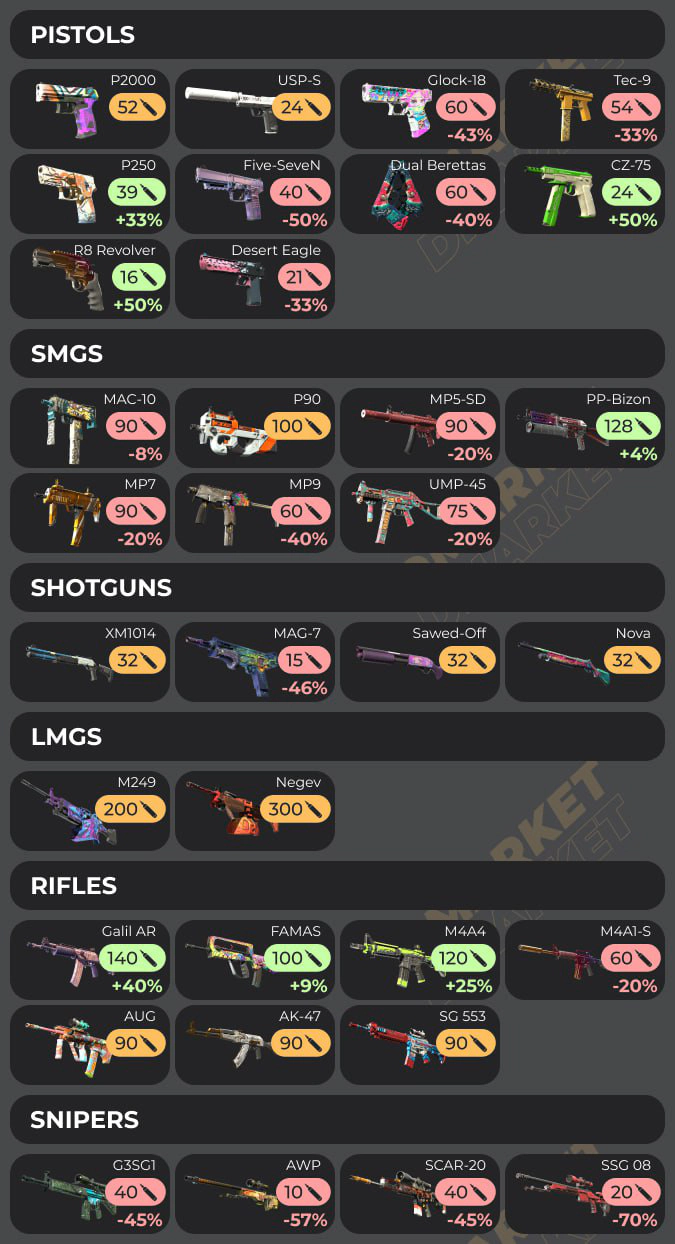
Reserve Ammo Changes: Exact Numbers
To make the situation even more impactful for players, Valve has changed the reserve ammo for many CS2 weapons. The new stats have a negative effect for some top-tier guns, such as the M4A1-S and the AWP.
How Does This Affect the Game?
The impact of this update is tremendous. It adds a layer of strategic planning for your actions in the game. The new reload system affects everyone playing CS2—up to the top-level professionals.
- Previously: Any safe situation was a nice moment to reload your weapon. You didn’t lose ammo unnecessarily.
- Now: On top of the safety measures, you should consider how many bullets are left in the magazine, to not throw away this precious reserve.
Weapons with decreased reserve ammo are affected the most. The chance to find yourself with no bullets is quite likely with them, especially for the sniper rifles.
Waves from this update will be visible all over CS2, including big esports events. Players should adjust their personal behavior, and teams in general may need to reevaluate their usual strategies.
The proclaimed ideas behind these changes is to motivate players not to spam bullets mindlessly and focus on accuracy. In this regard, learning CS2 spray patterns becomes even more crucial.
Learn Utility in Online Matchmaking
This part of the update is important for casual players. CS2 has received built-in official nade guides. Here is how to use them.
- Start playing a competitive online match.
- Press Esc to activate the pause menu.
- Select Official in the drop-down list for Map Guides.
- Play the game and look for special icons on the screen. Follow them to find spots for smoke usage. CS2 provides players with basic instructions.
- The nade guides work for the first five rounds of CS2 competitive matchmaking.
These guides are not as detailed as some specialized community-created maps on the Steam Workshop. Still, they teach the basics quite well. To improve your knowledge even further, start by checking out CS2 callouts in our detailed guides.
This CS2 update is one of the biggest adjustments Valve has released in quite a few years. We had big changes in the skin-related department with the knife trade-up contracts, introduced recently. Now, the new reload system and shuffles in the reserve ammo directly affect the gameplay.
Trade on the go - install the mobile app of DMarket from Google Play or App Store. Never miss great prices and unique skins. The best CS2, Dota 2, Rust and TF2 marketplace is always at hand!